
PDF viewer lite
AVR-Apps
May 3, 2019
4.53 MB
2.1
5.0
1,000,000+

Description
A Lightweight PDF Tool With Pro Power
PDF Viewer Lite proves that a small app can still deliver serious performance. Even though it carries the word lite, it works like a professional PDF viewer designed for users who value speed, stability, and simplicity. The app focuses on essential features that make reading and managing PDF files smooth on any Android device.
Built for Speed and Low Resource Usage
Many PDF apps slow down your phone. This one does not. PDF Viewer Lite uses very little RAM, which allows you to keep it running in recent apps while using your device normally. Because of its optimized structure, the app stays responsive even on older or low end phones. As a result, you enjoy fast loading and smooth scrolling without system lag.
Small Size With Big Advantages
Storage space matters. PDF Viewer Lite keeps its app size extremely small while still offering powerful tools. Compared to heavy PDF apps that take large space and memory, this app installs quickly and runs efficiently. Therefore, it suits users who want a clean device without unnecessary background consumption.
Smooth Reading Experience Every Day
Reading PDFs feels natural and fluid. The app scrolls pages smoothly, which improves focus during work, study, or casual reading. In addition, the interface stays clean and distraction free. Since the app does not show ads, you can read documents without interruptions or visual noise.
Open Source and Clean Design
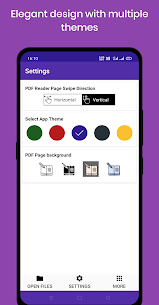
PDF Viewer Lite follows an open source approach. It does not include bloatware or hidden processes. Because of this, users can trust the app to focus only on PDF tasks. The simple design also makes navigation easy, even for first time users.
Useful PDF Tools in One Place
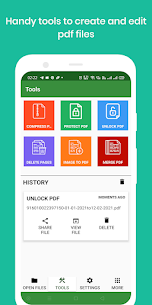
Beyond viewing, the app supports practical PDF operations. You can compress large PDF files to save space. You can set a password to protect sensitive documents or remove existing passwords when needed. The app also lets you delete unwanted pages, merge multiple PDFs, and convert images into PDF files. These tools help you manage documents directly on your phone.
Easy to Use for Everyone
The app keeps every feature easy to access. Clear menus and fast actions reduce learning time. As a result, students, professionals, and casual users can handle PDF files without confusion or delays.
Works Well With PDF Reader – PDF Editor
If you already use PDF Reader – PDF Editor, PDF Viewer Lite fits perfectly alongside it. You can use this app for fast viewing and lightweight tasks, while relying on the other app for advanced editing. Together, they create a flexible and efficient PDF workflow on Android.
PDF Viewer Lite delivers a balanced solution for users who want speed, control, and reliability in a compact APK.
Images


Download links
Related apps


Most viewed apps


